Showing posts with label open-source. Show all posts

Thursday, September 29, 2016

Publish Peewee ORM data to PDF with xtopdf

By Vasudev Ram

Peewee => PDF

Peewee is a small, expressive ORM for Python, created by Charles Leifer.

After trying out Peewee a bit, I thought of writing another application of xtopdf (my Python toolkit for PDF creation), to publish Peewee data to PDF. I used an SQLite database underlying the Peewee ORM, but it also supports MySQL and PostgreSQL, per the docs. Here is the program, in file PeeweeToPDF.py:
# PeeweeToPDF.py
# Purpose: To show basics of publishing Peewee ORM data to PDF.
# Requires: Peewee ORM and xtopdf.
# Author: Vasudev Ram
# Copyright 2016 Vasudev Ram
# Web site: https://vasudevram.github.io
# Blog: http://jugad2.blogspot.com
# Product store: https://gumroad.com/vasudevram

from peewee import *
from PDFWriter import PDFWriter

def print_and_write(pw, s):
    print s
    pw.writeLine(s)

# Define the database.
db = SqliteDatabase('contacts.db')

# Define the model for contacts.
class Contact(Model):
    name = CharField()
    age = IntegerField()
    skills = CharField()
    title = CharField()

    class Meta:
        database = db

# Connect to the database.
db.connect() 

# Drop the Contact table if it exists.
db.drop_tables([Contact])

# Create the Contact table.
db.create_tables([Contact])

# Define some contact rows.
contacts = (
    ('Albert Einstein', 22, 'Science', 'Physicist'),
    ('Benjamin Franklin', 32, 'Many', 'Polymath'),
    ('Samuel Johnson', 42, 'Writing', 'Writer')
)

# Save the contact rows to the contacts table.
for contact in contacts:
    c = Contact(name=contact[0], age=contact[1], \
    skills=contact[2], title=contact[3])
    c.save()

sep = '-' * (20 + 5 + 10 + 15)

# Publish the contact rows to PDF.
with PDFWriter('contacts.pdf') as pw:
    pw.setFont('Courier', 12)
    pw.setHeader('Demo of publishing Peewee ORM data to PDF')
    pw.setFooter('Generated by xtopdf: slides.com/vasudevram/xtopdf')
    print_and_write(pw, sep)
    print_and_write(pw, 
        "Name".ljust(20) + "Age".center(5) + 
        "Skills".ljust(10) + "Title".ljust(15))
    print_and_write(pw, sep)

    # Loop over all rows queried from the contacts table.
    for contact in Contact.select():
        print_and_write(pw, 
            contact.name.ljust(20) + 
            str(contact.age).center(5) + 
            contact.skills.ljust(10) + 
            contact.title.ljust(15))
    print_and_write(pw, sep)

# Close the database connection.
db.close()
I could have used Python's namedtuple feature instead of tuples, but did not do it for this small program.

I ran the program with:
python PeeweeToPDF.py
Here is a screenshot of the output as seen in Foxit PDF Reader (click image to enlarge):


- Enjoy.

- Vasudev Ram - Online Python training and consulting

Get updates on my software products / ebooks / courses.

Jump to posts: Python   DLang   xtopdf

Subscribe to my blog by email

My ActiveState recipes

FlyWheel - Managed WordPress Hosting


Thursday, April 23, 2015

Interview: Linux Journal with Larry Wall (1999)

Larry Wall, the Guru of Perl | Linux Journal http://m.linuxjournal.com/article/3394

Entertaining.

Posted via mobile.
Vasudev Ram
Software training and consulting.
Python, Linux, SQL databases, open source technologies.
www.dancingbison.com

Thursday, October 9, 2014

The Linux Foundation's new Linux Certification program

By Vasudev Ram


Saw this recently via the newsletter I get from The Linux Foundation

The Linux Foundation is introducing a new Linux certification program. It will be available anywhere, online.

Jim Zemlin, the executive director of the Linux Foundation, has details about it in this blog post:

Linux Growth Demands Bigger Talent Pool

There are two certifications:

Linux Foundation Certified System Administrator (LFCS)

Linux Foundation Certified Engineer (LFCE)

These Linux certifications are likely to be a good value addition to anyone seeking to start or grow a career involving Linux, since they are from the official foundation that is behind Linux - the Linux Foundation, which does a lot of work related to sponsoring Linux development (*), conducting conferences like LinuxCon, etc.

In fact, the Linux Foundation sponsors the work of Linux Torvalds, the founder of Linux - Linus is a Linux Foundation Fellow. See this page about the Linux Fellow Program - Linus's name is at the top of the list of Linux Fellows.
On a related note, if you are into Linux and would like to learn how to write Linux command-line utilities in C, check out this blog post by me on the topic of Developing a Linux command-line utility in C, an article I wrote for IBM developerWorks a while ago. It got many views and a 4-star rating, and some people have told me they used the article (which is a tutorial) as a guide to developing command-line utilities on Linux for production use.


- Vasudev Ram - Python and Linux training and consulting - Dancing Bison Enterprises

Click here to signup for email notifications about new products and services from Vasudev Ram.

Contact Page

Sunday, October 6, 2013

The ERPNext Story (a Python-based ERP package)


By Vasudev Ram

ERPNext is an ERP package developed by Web Notes Technologies, a Mumbai based company. I got to know about them and their product some time ago when I exchanged emails with the founder. Checked them out again recently. I found the product and company interesting.

ERPNext is developed using Python, JavaScript, MySQL and their own web framework called wnframework (Github).

ERPNext recently received a mention at the InfoWorld BOSSIE awards, 2013.

Excerpt from the above award page (emphasis mine):

[ ERPNext is a relative newcomer in the world of integrated, open source ERP. This India-based project is targeting smaller companies but has managed to pack in a lot of features while remaining relatively easy to use and configure. Built with Python and JavaScript, ERPNext is fully Web-based and quite comprehensive, recently adding an integrated website and shopping cart for selling online. ... the core team posts presentations every month to update the community on news and strategy. This project has a bright future. ]

This is the ERPNext story:


Here are some of their customer stories.

And finally, I liked this line from the bottom of their About page:

[ This website is generated from within ERPNext. ERPNext has a basic Content Management System that lets you define pages, blogs for your website. ]

- Vasudev Ram

Contact Dancing Bison Enterprises


-90% : Online Language Courses Blue

Wednesday, October 2, 2013

Convert Microsoft Word files to PDF with DOCXtoPDF


By Vasudev Ram


DOCX to PDF

Building upon my recent post, here:

Extract text from Word .docx files with python-docx,

I came up with the idea of combining that DOCX text extraction functionality of python-docx with my xtopdf toolkit, to create a program that can convert the text in Microsoft Word DOCX files to PDF format.

[ Note: The conversion has some limitations. E.g. fonts, tables, etc. from the input are not preserved in the output. ]

Here is the program, called DOCXtoPDF.py. It will become a part of my xtopdf toolkit.

# DOCXtoPDF.py

# Author: Vasudev Ram - http://www.dancingbison.com
# Copyright 2012 Vasudev Ram, http://www.dancingbison.com

# This is open source code, released under the New BSD License -
# see http://www.opensource.org/licenses/bsd-license.php .

import sys
import os
import os.path
import string
from textwrap import TextWrapper
from docx import opendocx, getdocumenttext
from PDFWriter import PDFWriter

def docx_to_pdf(infilename, outfilename):

    # Extract the text from the DOCX file object infile and write it to 
    # a PDF file.

    try:
        infil = opendocx(infilename)
    except Exception, e:
        print "Error opening infilename"
        print "Exception: " + repr(e) + "\n"
        sys.exit(1)

    paragraphs = getdocumenttext(infil)

    pw = PDFWriter(outfilename)
    pw.setFont("Courier", 12)
    pw.setHeader("DOCXtoPDF - convert text in DOCX file to PDF")
    pw.setFooter("Generated by xtopdf and python-docx")
    wrapper = TextWrapper(width=70, drop_whitespace=False)

    # For Unicode handling.
    new_paragraphs = []
    for paragraph in paragraphs:
        new_paragraphs.append(paragraph.encode("utf-8"))

    for paragraph in new_paragraphs:
        lines = wrapper.wrap(paragraph)
        for line in lines:
            pw.writeLine(line)
        pw.writeLine("")

    pw.savePage()
    pw.close()
    
def usage():

    return "Usage: python DOCXtoPDF.py infile.docx outfile.txt\n"

def main():

    try:
        # Check for correct number of command-line arguments.
        if len(sys.argv) != 3:
            print "Wrong number of arguments"
            print usage()
            sys.exit(1)
        infilename = sys.argv[1]
        outfilename = sys.argv[2]

        # Check for right infilename extension.
        infile_ext = os.path.splitext(infilename)[1]
        if infile_ext.upper() != ".DOCX":
            print "Input filename extension should be .DOCX"
            print usage()
            sys.exit(1)

        # Check for right outfilename extension.
        outfile_ext = os.path.splitext(outfilename)[1]
        if outfile_ext.upper() != ".PDF":
            print "Output filename extension should be .PDF"
            print usage()
            sys.exit(1)

        docx_to_pdf(infilename, outfilename)

    except Exception, e:
        sys.stderr.write("Error: " + repr(e) + "\n")
        sys.exit(1)

if __name__ == '__main__':
    main()

# EOF


To run DOCXtoPDF, give a command of the form:

python DOCXtoPDF.py infilename.docx outfilename.pdf

After this, the text content of the DOCX file will be in the PDF file.

- Enjoy.


Read other posts about xtopdf on this blog.
Read other posts about Python on this blog.

- Vasudev Ram - Dancing Bison Enterprises

Training or consulting inquiry


O'Reilly 50% Ebook Deal of the Day


Tuesday, August 20, 2013

Publish SQLAlchemy data to PDF with xtopdf


By Vasudev Ram

SQLAlchemyToPDF is a demo program that shows how to publish your database data via SQLAlchemy to PDF.


SQLAlchemy is a popular and widely used database toolkit for Python. It includes both a Core, which consists of a sort of DSL (Domain-Specific Language) for SQL, written in Python, and an ORM (Object Relational Mapper) which is built on top of the Core.

SQLAlchemyToPDF, after some improvement, will become a part of my xtopdf toolkit for PDF creation. It will be released under the BSD license, like the rest of xtopdf.

Using the technique shown below (with appropriate modifications), you can publish data, from any of the major databases that SQLAlchemy supports, to PDF. And you can do this using the high-level interface provided by SQLAlchemy's ORM, which means code that is shorter and easier to write.

However, SQLAlchemy also provides you the ability to go to a lower level when needed, to access more of the power of SQL or of a specific database.

Here is the code for SQLAlchemyToPDF.py:
# SQLAlchemyToPDF.py
# Program to read database data via SQLAlchemy 
# and publish it to PDF. This is a demo.
# Author: Vasudev Ram - http://www.dancingbison.com
# Copyright 2013 Vasudev Ram
# Version 0.1

from PDFWriter import PDFWriter
from sqlalchemy import create_engine

engine = create_engine('sqlite:///:memory:', echo=False)

from sqlalchemy.ext.declarative import declarative_base
Base = declarative_base()

from sqlalchemy import Column, Integer, String

class User(Base):
    __tablename__ = 'users'

    id = Column(Integer, primary_key=True)
    name = Column(String)
    fullname = Column(String)
    email = Column(String)

    def __init__(self, name, fullname, email):
        self.name = name
        self.fullname = fullname
        self.email = email

Base.metadata.create_all(engine) 

a_user = User('A', 'A 1', 'A1@gmail.com')
b_user = User('B', 'B 2', 'B2@yahoo.com')
c_user = User('C', 'C 3', 'C3@hotmail.com')

from sqlalchemy.orm import sessionmaker
Session = sessionmaker(bind=engine)

session = Session()

for user in (a_user, b_user, c_user):
    session.add(user)

pw = PDFWriter('users.pdf')
pw.setFont("Courier", 12)
pw.setHeader("SQLAlchemyToPDF - User table report")
pw.setFooter("Generated by xtopdf using Reportlab and Python")

users = session.query(User)
for user in users:
    pw.writeLine(user.name + "|" + user.fullname + "|" + user.email)

pw.savePage()
pw.close()


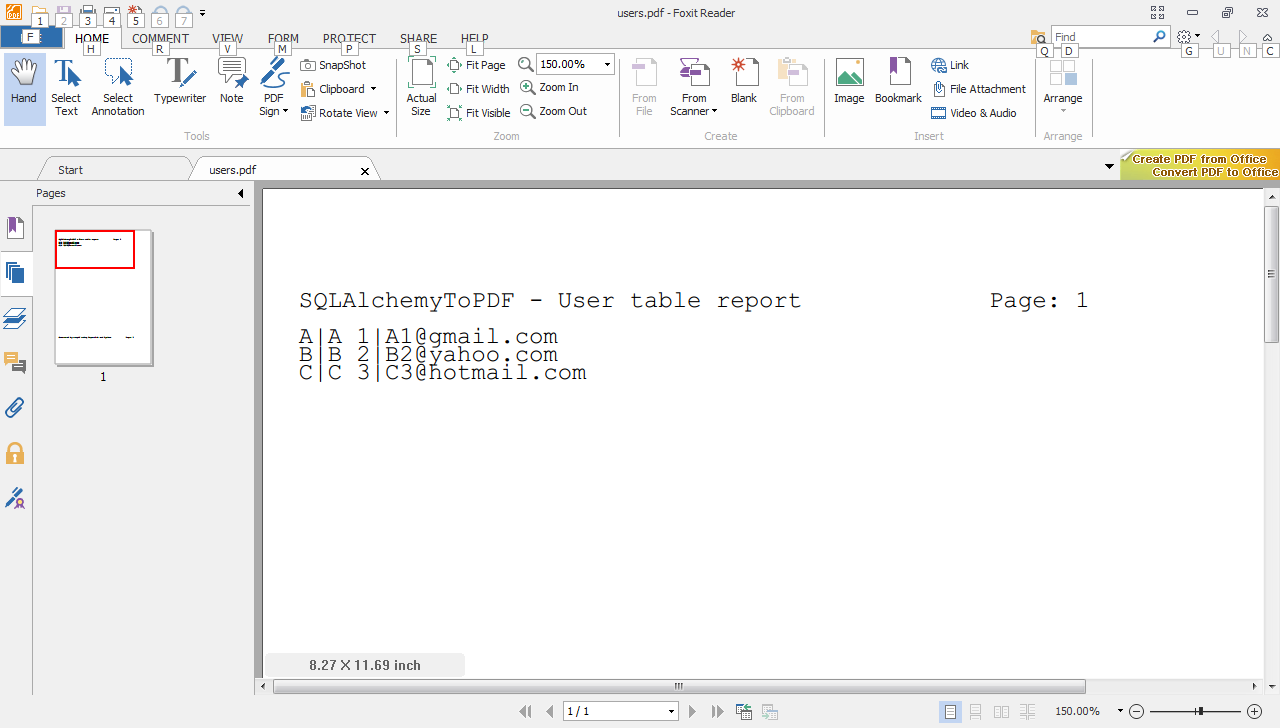
I used an in-memory SQLite database to keep the code simple. Refer to the SQLAlchemy documentation for how to connect to other databases.

And here is a screenshot of the resulting PDF output:


Read other xtopdf posts on jugad2

Read other python posts on jugad2

- Vasudev Ram - Dancing Bison Enterprises

Contact me

Thursday, August 15, 2013

Free Webinar - Intro to OpenStack - by the Linux Foundation


By Vasudev Ram

I saw this news via the Linux Foundation's email newsletter.

The Linux Foundation is hosting a free webinar, Introduction to OpenStack Cloud.

OpenStack is FOSS (Free and Open Source Software) for deploying public and private clouds. NASA and Rackspace were among the original developers of OpenStack. In a short few years, OpenStack has become what may be the largest open source project after Linux (as I've heard it said).

OpenStack

OpenStack on Wikipedia

About the Linux Foundation

The Linux Foundation sponsors the work of Linus Torvalds, the original creator of Linux:

Linux Foundation staff

(I originally made a typo in the name of Linus above, wrote Linux :) Sorry, readers via Planet Python. Though I corrected it soon, it was already included in the feed. On the other hand, it might not be a bad moniker for him, considering what he's achieved :), along with countless others, of course.

Excerpt from the newsletter about the free OpenStack webinar:

[
Cloud Computing has taken the IT world by storm over the last few years. Advances in virtualization technology have made it possible to not only make much more efficient use of available hardware, but to offer it with previously unheard-of levels of flexibility. Furthermore, sysadmins and devops need not reinvent the wheel when deploying a cloud: a vibrant ecosystem has grown from the need for quality free and open-source tools to build such an infrastructure.

Due to the organized structure of OpenStack, rapid development, and flexible components, in just over three years, it has risen in the F/OSS community as the platform of choice for private and public cloud deployments. In this webinar, Adolfo Brandes, an OpenStack technical consultant for hastexo, will give an overview of why that is, including:

An overview of OpenStack and its components
A live demonstration of an OpenStack Cloud
Best practices on how to do a first deployment
]

Here are the webinar details:

Date: Wednesday, August 28th, 2013
Time: 9am Pacific / Noon Eastern / 1800 CEST

OpenStack is written in Python, and uses SQLAlchemy for database access.

SQLAlchemy is a database toolkit for Python, which provides both a "Core" Pythonic interface to the generic as well as specific capabilities of various relational databases, and also a higher-level ORM (Object Relational Mapper) built upon the Core.

Here is a video of Mike Bayer's Introduction to SQLAlchemy presented at the last PyCon 2013 in the US:


The list of members of the Linux Foundation is large, and colorful :) due to all the corporate logos.

Linux posts on jugad2

- Vasudev Ram - Dancing Bison Enterprises

Contact me

Tuesday, August 13, 2013

The most-watched Python repositories on Github


By Vasudev Ram

Saw this via this Python Reddit thread.

Github keeps track of the most-watched repositories by language.

Here are the most-watched Python repositories on Github

And similarly, here are the most-watched Ruby repositories on Github.

Interesting to see the projects on those lists. Some are obviously well-known, like Django and requests for Python, Rails for Ruby, and so on. But there are also some that many people may not have heard of.

I've blogged about some of those Python projects in the past, such as boto, glances, pattern, scrapy, youtube-dl, kivy, watchdog, topaz. You should be able to find most of those posts by doing Google searches of the form jugad2+kivy or jugad2+boto.

- Vasudev Ram - Dancing Bison Enterprises

Python posts on jugad2

xtopdf posts on jugad2

Contact me


Saturday, March 2, 2013

Dancing Bison Enterprises - Profile

               Dancing Bison Enterprises - Profile

Dancing Bison Enterprises is a small software company based in Pune, India.

We have done projects for USA-, Europe- and India-based clients in Python, Ruby on Rails, C, Java, PDF and other technologies. We have good skills and experience in Python, C, UNIX/Linux, Java, Ruby, relational databases, PDF creation, and multiple open source technologies, and in software requirements analysis, design and implementation. Development of robust software applications and components is our forte. Open source technologies and UNIX/Linux are two of our key areas of strength - we have been working with UNIX from some time before Linux was first created, and with open source software from before the term "open source" was coined. Have many years of software development experience, including both working with large international and Indian software companies and with small companies, including startups based both abroad and in India.

Please visit our business web site www.dancingbison.com for an overview about us.

The founder of the company, Vasudev Ram, is a nominated / elected member of the Python Software Foundation.

Developed multiple open source software products/projects - please see our Products page , and our Bitbucket page . More such products are in the pipeline.

Packt Publishing of the UK uses our Python product, xtopdf, in their book production workflow. The Software Freedom Law Center of the USA also uses xtopdf as part of their e-discovery work.

Published technical articles on Python, C and Linux; please see:

Using xtopdf (on the Packt Publishing site)

Developing a Linux command-line utility (on the IBM developerWorks site)

A vi quickstart tutorial (in Linux For You magazine)

How Knoppix saved the day (in Linux For You magazine)

Our article on Developing a Linux command-line utility - the 2nd link in the list of articles above - was published on IBM developerWorks, and translated by IBM for the Chinese and Japanese versions of their developerWorks site. More than one organization has used the article as a basis for developing production command-line tools.

We are available for web or non-web application development, open source and related consulting/contract work, and for corporate software training in the areas of our skills.

Please visit our Contact page to get in touch with us or to request a quote.

Sunday, February 24, 2013

vitess - scalable RPC interface to MySQL, used by YouTube

vitess - Scaling MySQL databases for the web - Google Project Hosting


Vitess, used at YouTube, is a scalable RPC interface to MySQL, with sharding, limited ACID support, Python and Go client interfaces, and other features.

.

Monday, January 7, 2013

mosh, the roaming mobile shell from MIT

Mosh: the mobile shell

Just seen via Hacker News.

mosh looks very interesting based on the description at the link above.

Excerpt:

( Mosh
(mobile shell)
Remote terminal application that allows roaming ,
supports intermittent connectivity , and provides
intelligent local echo and line editing of user
keystrokes.
Mosh is a replacement for SSH. It's more robust
and responsive, especially over Wi-Fi, cellular, and
long-distance links.
Mosh is free software, available for GNU/Linux,
FreeBSD, Solaris, Mac OS X, and Android. )

And that's just first part of that intro page, which is fairly long and has lots of interesting details on the benefits of mosh, as well as some background on its internals. I read a large part of it. The Android port is experimental, by a third party, but they are working on an official one.

HN thread about it (early, will probably grow) includes some possible cons too:

http://news.ycombinator.com/item?id=5016745

- Vasudev Ram
www.dancingbison.com

Thursday, December 20, 2012

Thursday, December 13, 2012

REBOL, language that influenced JSON, is now open source

Comments on: R3 Source Code Released!

REBOL is an interesting language. It's free to download, available for both Linux and Windows, and quite small in size (MB).

UPDATE: Carl's comment on building REBOL from source, in the REBOL repo on Github, mentions Android as a platform that REBOL can be built for. Interesting  ...

It can be used at the command line for useful one-liners, in command-line scripts, and even to write GUI programs.

It has built-in support for some common Internet protocols.

And many other features.

I had tried out REBOL  for some time, somewhat soon after it was first released several years ago, and found it fun to use.

REBOL  was created by Carl Sassenrath, who also was the main designer of the Amiga computer and OS, a very advanced PC for its time, including multitasking and advanced multimedia when almost no other computers had it.

Main REBOL site for downloading the language interpreters, documentation, examples:

www.rebol.com

REBOL is now open source:

https://github.com/rebol/r3

Hacker News thread about the open sourcing of REBOL:

http://news.ycombinator.com/item?id=4912963

Has interesting points. More than one commenter pointed out that REBOL was an influence on JSON, which was News (heh) to me:

https://erikeldridge.wordpress.com/2009/07/28/notes-bayjax-meetup-yahoo-sunnyvale-727-crockford-the-json-saga/

- Vasudev Ram
www.dancingbison.com

Wednesday, December 12, 2012

Swiss city Bern may move to open source software

Majority in Bern council tells Swiss city to switch to open source | Joinup

Also see:

http://news.ycombinator.com/item?id=4891881

Open source is no panacea, though. Properly researched and evaluated decisions, investment,  and training and implementation are still needed.

Tuesday, November 6, 2012

Appsembler, a SaaS enablement service for open source web apps

By Vasudev Ram

Appsembler is a SaaS enablement platform for open source web apps.

From the Appsembler site: "We help developers monetize their software, and make it painless for end users to try their software."

This is the Appsembler main page for developers.

Saw Appsembler via a chain of links. Only checked it out a little so far, but live chatted with one of the founders, Nate Aune. He said it runs on Stackato, the PaaS from ActiveState.

Multiple programming languages and web frameworks are supported, according to Nate, but for Python, only Django is, currently. Also, it works better if you have a Github account for your SaaS app.

Here is a blog post by Nate about Django deployment using PaaS.

- Vasudev Ram - Dancing Bison Enterprises

Saturday, November 3, 2012

PDFBuilder can create composite PDFs


By Vasudev Ram

PDFBuilder is a tool to create composite PDFs, i.e. PDFs comprising of data from multiple different input data formats. It is a new component of my xtopdf toolkit for PDF generation.

At present, for input formats, PDFBuilder supports only CSV (Comma Separated Values, which can be exported from / imported to spreadsheets, among other things) and TDV / TSV (Tab Delimited Values / Tab Separated Values), which many UNIX / Linux tools like sed, grep, and awk, can create or process).

But support for more input formats can be added fairly easily, due to the design.

PDFBuilder is included in xtopdf v1.4 (just released on Bitbucket).

To try PDFBuilder:

- Download xtopdf v1.4, then follow the steps in the file README.txt; the steps include installing Python (>= v2.2), if you don't have it already, and Reportlab v1.21. (The steps for installing ReportLab are here.)

Then run this command:
python PDFBuilder.py output.pdf
This will create a composite PDF file, output.pdf, from two CSV files and two TDV files (interleaved). This is hard-coded as of now, but will be changed to take a list of input files from the command-line.

The download includes the 4 input files and the corresponding output PDF file.

Note: The xtopdf links on SourceForge and my site dancingbison.com have not yet been updated for xtopdf v1.4, so don't try to get v1.4 from there, for now.

You can read more about the ReportLab toolkit here.

- Vasudev Ram - Dancing Bison Enterprises

Sunday, October 28, 2012

Performance: ZeroMQ: throughput is not the inverse of latency


By Vasudev Ram

Interesting study of performance, throughput and latency (among other things) in the chapter about the ZeroMQ asynchronous messaging library, in the book Architecture of Open Source Applications (Vol. 2), which I blogged about recently.

See Section 24.3. Performance, in that chapter, for the stuff about throughput and latency.

- Vasudev Ram - Dancing Bison Enterprises


Thursday, October 25, 2012

Book: The Architecture of Open Source Applications, Volume 2


Saw this via Twitter:

The Architecture of Open Source Applications (Volume 2)

The book is free to read online.

It has several contributors, and has chapters on the architecture of many open source applications.

Contributors include people working on:

Firefox (release engineering),
SQLAlchemy,
matplotlib,
Moodle,
Processing.js,
Puppet,
The Glasgow Haskell Compiler,
Twisted,
PyPy,
Git,
GDB,
ZeroMQ,
Mailman and more.

That's a lot of reading material, but having read parts of a couple of chapters, I think it is likely to be interesting.

Currently reading the chapter about Twisted, and am finding it interesting. It includes some of the history of why it was built (to fulfill a need), by glyph, the original creator of Twisted.

The Architecture of Open Source Applications (Volume 2)